What Is MetaMask?
MetaMask is a widely used software cryptocurrency wallet available as a browser extension and mobile app. It was developed in 2016 and is primarily used for managing cryptocurrency on the Ethereum network and other compatible networks like Polygon, BNB Chain, and Arbitrum. It acts as both a wallet for your digital assets and a way to connect with online services such as decentralized applications, DeFi protocols, and NFT marketplaces.
MetaMask has grown significantly, with over 30 million people actively using it each month. This popularity means it is a frequent target for hackers and scammers, making strong security practices essential.
Disclaimer: This article is for informational purposes only and does not constitute financial advice. Always conduct your own research before making any financial decision.
Security Tips for MetaMask Users
Protecting your MetaMask wallet is very important. Here are key practices to keep your digital assets safe:
- Use Strong, Unique Passwords and a Password Manager. Always create a strong, one-of-a-kind password for your wallet. A password manager can securely store these complex passwords so you don't have to remember each one, reducing risks from widespread data breaches where personal information can be exposed.
- Protect Your Seed Phrase Like an Elephant Protects Its Calf. Your seed phrase is a special list of words that acts like a master key to your cryptocurrency wallet. Anyone with your seed phrase can access your funds.
- The safest way to protect it is to store it completely offline. Consider writing it down on paper and hiding it in multiple secure places. You can also use special metal crypto wallets designed to withstand extreme conditions like fire and floods.
- Stay Vigilant Against Phishing Scams. A phishing attack is a scam where malicious people try to trick you into revealing sensitive information, such as your seed phrase or other personal details. Scammers often send fake emails that look like they are from MetaMask, redirecting you to fake websites.
- Never input your seed phrase unless you are specifically recovering your account on an official platform. Be cautious of emails, avoid downloading files, and do not click on random links without first verifying the sender's authenticity, as these can install malware on your device.
- Use a Hardware Wallet for Your Main Holdings. MetaMask is a hot wallet, meaning it is always connected to the internet. While convenient, this makes it more vulnerable to hacking attempts. A hardware wallet is a physical device that stores cryptocurrency, keeping the majority of your assets offline for superior security.
- Consider storing most of your cryptocurrency on a hardware wallet, especially if you don't plan to actively trade it. Why Does a Hardware Wallet Matter? It keeps your assets offline for superior security. Even with a hardware wallet, you remain vulnerable to phishing attacks if you aren't careful.
- Keep MetaMask Software Updated. MetaMask regularly releases updates that include new security features. Ensure your software is always up to date. While it often updates automatically, you can manually check for updates in your browser's extension settings or your mobile app store.
- Lock Your MetaMask Wallet When Not in Use. Locking your wallet significantly reduces the risk of hacking. When unlocked, some websites may be able to view your wallet address, making you more susceptible to phishing attacks.
- Regularly Clean Your Browser Data. Make a habit of clearing your browser's cache, cookies, and history at least once a week. This simple step helps prevent hackers from collecting personal information that could be used to impersonate you.
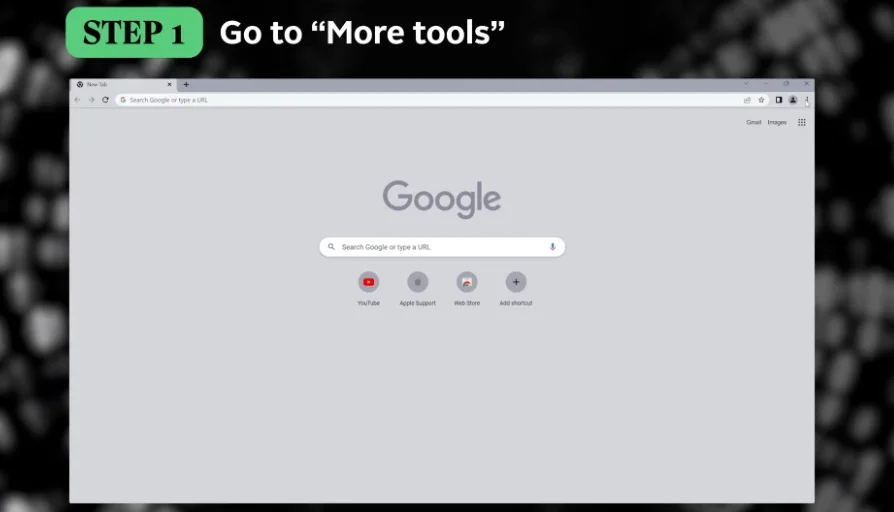
- Use a Separate Browser Profile for MetaMask. Malicious browser extensions can sometimes have excessive permissions to read your data. To enhance security, consider using a dedicated browser profile solely for your MetaMask extension, free from other extensions.
- Avoid Public Wi-Fi for Financial Activity. Using public Wi-Fi can put your personal information at risk, as you cannot be sure who is managing or monitoring the network. There have been instances of people being hacked while using public Wi-Fi. It is best to avoid any financial transactions while connected to public networks.
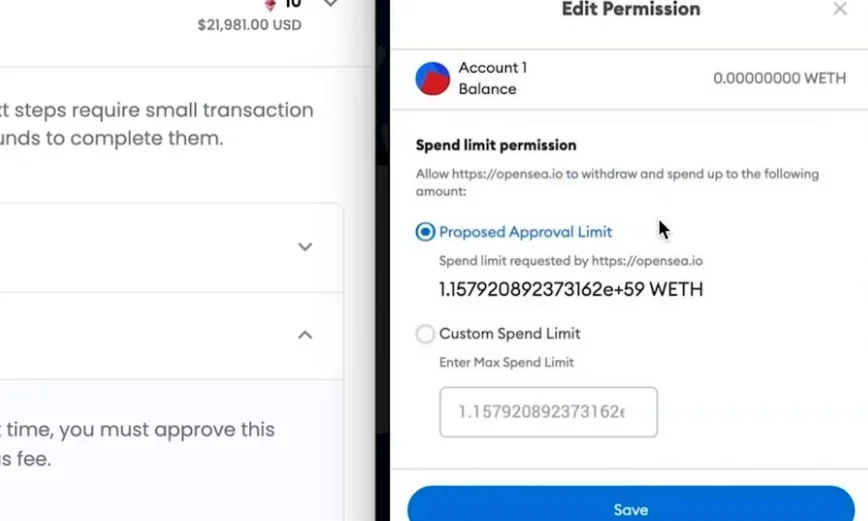
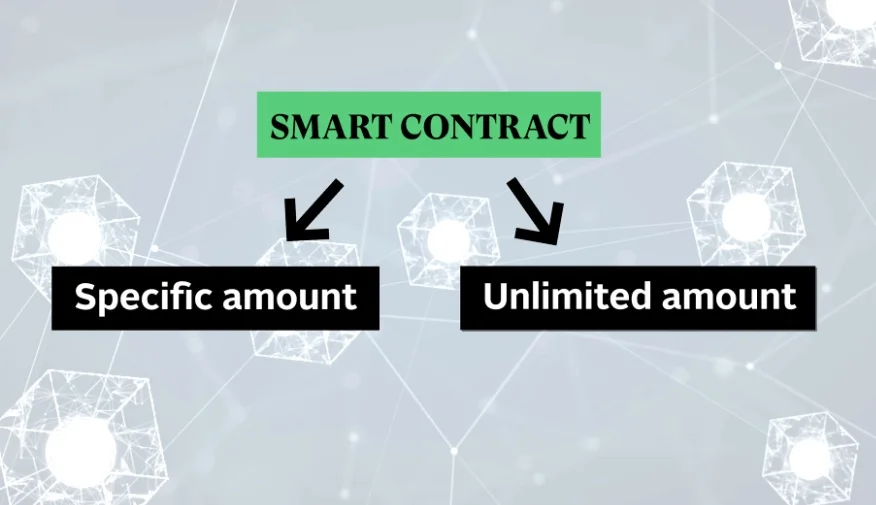
- Review and Revoke Token Approvals Regularly. To interact with smart contracts – automatic programs on a blockchain – you often grant token approvals for them to use your assets. These approvals can sometimes be for an unlimited amount of your cryptocurrency, which malicious developers can exploit to drain your wallet.
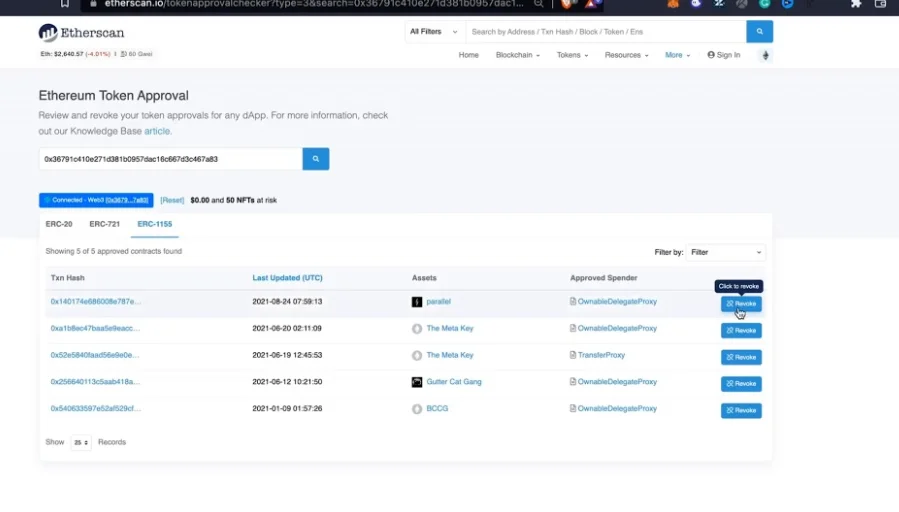
- When approving a transaction in MetaMask, always click 'Edit Permissions' and set a specific spending limit to prevent the application from transacting above that amount. You can also use a Block Explorer like Etherscan to review and revoke past token approvals you've granted. Be aware that revoking an approval usually requires paying a small gas fee.
Key Terms You Should Know
Term | Plain-English Meaning |
|---|---|
Seed phrase | A special list of words that acts like a master key to your cryptocurrency wallet. |
Phishing attack | A scam where malicious people try to trick you into revealing sensitive information, like your seed phrase. |
Hot wallet | A cryptocurrency wallet that is always connected to the internet, making it convenient but more vulnerable to hacking. |
Hardware wallet | A physical device that stores cryptocurrency, keeping it mostly offline for better security. |
Public Wi-Fi | Internet connections available in public places that can be insecure and monitored by others. |
Smart contract | An automatic program stored on a blockchain that runs when certain conditions are met, often requiring your permission to access your funds. |
Token approval | Permission you grant to a smart contract to use a specific amount, or an unlimited amount, of your cryptocurrency assets. |
Block Explorer | A tool that lets you view information about transactions and smart contract activities on a blockchain. |
Gas fee | A small payment made to the network for processing transactions on a blockchain. |
Common Misconceptions
- Misconception: MetaMask will email you regarding your account or ask for personal identification information.
- Correction: MetaMask will never collect personal identification (KYC) information and will never email users regarding their account. Any email or request for personal ID claiming to be from MetaMask is a scam.
MetaMask (Hot Wallet) vs Hardware Wallet
Understanding the differences between types of wallets can help you decide how to best store your cryptocurrency.
MetaMask (Hot Wallet) | Hardware Wallet | |
|---|---|---|
Connection | Always online, connected to the internet. | Mostly offline, only connects when needed. |
Convenience | More convenient for frequent transactions and interacting with online services. | Less convenient as it requires a physical device for transactions. |
Security | More vulnerable to hacking attempts because it is always online. | Offers superior security by keeping assets offline, reducing online risks. |
Use Case | Ideal for active trading or interacting with decentralized applications. | Best for storing the majority of your crypto wealth for long-term security. |
Frequently Asked Questions
Is MetaMask safe?
MetaMask can be safe if you follow strict security practices. Its popularity makes it a target for scammers, so using strong passwords, protecting your seed phrase, and being vigilant against phishing attacks are crucial for keeping your assets secure.
What is a seed phrase and why is it important?
A seed phrase is a list of words that acts as your wallet's master key. It's incredibly important because anyone who knows your seed phrase can access and control your cryptocurrency. You must protect it carefully and store it offline.
What are phishing scams?
Phishing scams are tricks used by malicious actors to get you to reveal sensitive information, like your seed phrase. They often involve fake emails or websites that look legitimate but are designed to steal your information. Always verify the source before clicking links or entering data.
Should I use public Wi-Fi with MetaMask?
It is strongly advised to avoid using public Wi-Fi for any financial activities involving MetaMask or other cryptocurrency wallets. Public networks are often insecure, and your personal information, including wallet data, can be at risk of being monitored or intercepted.
What are token approvals and why should I check them?
Token approvals are permissions you grant to smart contracts, allowing them to use your cryptocurrency. Sometimes these can be set to unlimited amounts, which poses a risk if the smart contract is malicious. Regularly reviewing and revoking these approvals, and setting specific spending limits, helps protect your funds from unauthorized use.
How do I protect my MetaMask from hackers?
To protect your MetaMask, use a strong password, keep your seed phrase offline and secret, use a hardware wallet for large amounts of crypto, be wary of phishing scams, keep your software updated, lock your wallet when not in use, and avoid public Wi-Fi for transactions.